XLS/Loader
(C) gho(at)gmx.net 2008, 2009, 2026
What it does for you
Transfers your Microsoft Excel worksheet, when structured as simple table, quickly and easily into your RDBMS.
Supports Oracle™, MariaDB/MySQL™, PostgreSQL.
Why it may be useful
You get data as file that...
- must be joined with data in a database for transformation or reporting tasks
- can be easier analyzed with SQL than MS Excel
Or use MS Excel worksheets to design your database tables w/o SQL but real data.
What it needs
Written in Java™ - needs at least Java™ 11.
How it works
Steps to do...
- Workbook: Select your workbook file (.xls/.xlsx) in your file system (initially done when application is started).
- Worksheet: Select a worksheet contained in the workbook.
- System: Select your RDBMS.
- Driver: Optional. Change JDBC driver (select different driver file and/or specify different class name).
- URL: Enter JDBC URL for your RDBMS or select one you have already used before.
- Remove: Optional. Remove currently selected URL if obsolete.
- Test: Test selected JDBC URL.
- Table: Optional. Change table name proposal (derived from worksheet name).
- Drop Existing: If selected, an already equally named table in your RDBMS will be dropped on load.
- Default Schema: Optional. Select a schema of your RDBMS where the table should be created.
- Default Tablespace (Oracle/Postgres): Optional. Select the tablespace where the table should be created.
- Analyze Worksheet: The selected worksheet gets analyzed and the table below is filled with the proposed table structure. The structure can be edited (e.g. to modify column name, type, length or select the primary key columns).
- 1st Row Has Names: If selected (default), it is assumed that contents of the first row in the worksheet contains column names. Otherwise, if first row of your worksheet already contains data, analyze process will result in column names following MS Excels native naming pattern ("A", "B", "C", ...).
- Table DDL: Shows DDL command used to create the table on load.
- Include Row Number: If selected (default), an extra column ("rownum_") is inserted as tables first column which is filled with the row number of complementary row in the source worksheet on load. If no primary key columns are selected explicitly in the above table structure this column also becomes the primary key column.
- Exclude Empty Columns: If checked, columns in the source worksheet which contains no data are excluded from table creation.
- Load: Start the process of taking over the worksheet into the RDBMS.
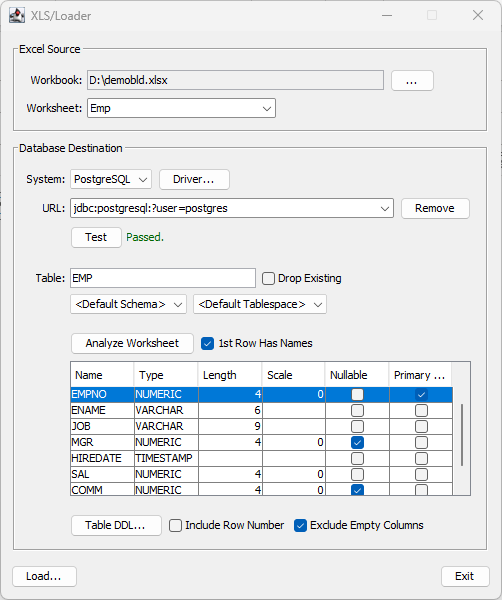
Watch the steps here as video.
Read application notes.
Go to project page on sourceforge.net to download.